
FreePrints Photo Art
PlanetArtPhotography
4.8339.00 Reviews
- Version
- 2.12.4
- Installs
- 500.00K
- Age Rating
- Everyone
Screenshots
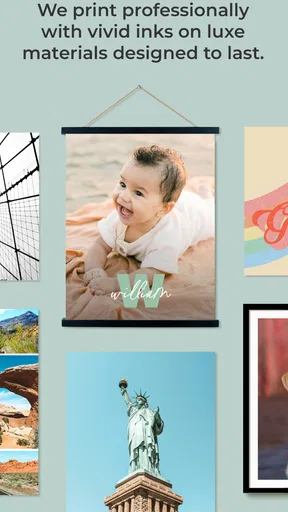
Our Review of FreePrints Photo Art
 Analysis by Appyee
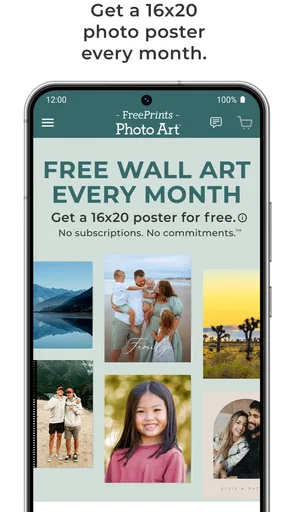
I approached FreePrints Photo Art as a simple way to turn a personal image into something I could actually display, rather than leaving it buried in my camera roll. It is a free photography app from PlanetArt built around a recurring wall-art offer: the idea is to receive a photo poster each month without paying a subscription. That makes it interesting for people who want a low-commitment way to decorate a room, remember a trip, or give a small personal gift.
My first impression was that the app makes more sense when treated as a guided print-ordering tool than as a full photo editor. I would not open it expecting the creative controls of a professional editing suite. Instead, I would use it after choosing a photo, when I already know the memory or image I want to put on a wall. That narrower purpose is also its main strength: there are fewer decisions to make, but fewer opportunities to customize the result in detail.
The app sits in the Photography category, is free to install, and is rated for Everyone. Its current version is 2.12.4, and it requires Android 10 or later. It has reached over 500 thousand installs, with an average rating of 4.8 from around 7.4 thousand ratings. Those figures suggest that the straightforward print concept appeals to a real audience, although I still think the final experience depends heavily on the quality of the chosen image and how comfortable the user is with ordering physical products from a phone.
How clearly the app guides you from image to wall art
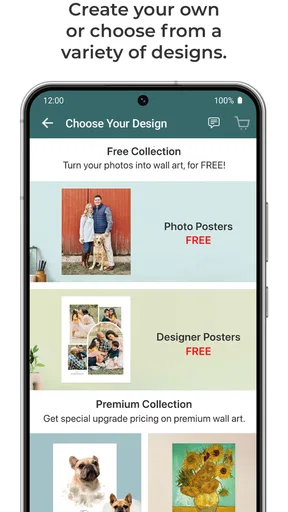
The most useful way to judge the interface is by asking whether someone can understand the next step without already knowing how photo printing works. In my experience, this type of application benefits from a direct sequence: choose an image, inspect how it fits, continue through the order, and review the result before committing. FreePrints Photo Art is best suited to that kind of focused task rather than browsing through a large collection of creative tools.
That simplicity can help people who find crowded editing apps tiring. A typical photo editor may place filters, layers, cropping tools, adjustment sliders, templates, and export settings on the same screen. Here, the central purpose is much easier to explain to a friend: select a picture and prepare it as wall art. For first-time users, reducing the number of visible choices can make the process less intimidating.
I also see a practical benefit for users who do not want to learn design terminology. You do not need to understand color grading or manual layout techniques to begin. The important decisions are more familiar: which photo to use, whether the composition looks right, and whether the finished piece suits the intended space. That makes the app approachable for casual photographers, families, and anyone preparing a small personal gift.
Readability is not only about large text. It is also about keeping instructions close to the action they describe. When an app moves a user through a purchase or print workflow, labels need to be unambiguous. A button that advances the order should feel different from one that changes the image. A preview should be recognizable as a preview, not mistaken for the final confirmation. These details matter especially for people who read slowly, use screen magnification, or need extra time to check each screen.
My advice is to slow down at the preview stage instead of tapping through automatically. Look at the edges of the picture, check whether a face or important object is too close to the border, and make sure the image still communicates what you intended when reduced to poster form. This is a more important quality check than adding another filter. A photo that looks excellent on a phone can feel unbalanced once it becomes a larger physical display.
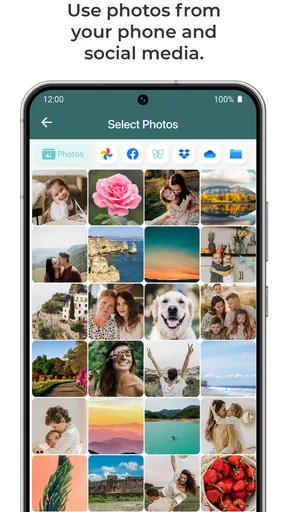
Another useful habit is to prepare a small shortlist of images before opening the app. Searching through a large camera roll while also making layout decisions can be tiring, particularly on a smaller screen. I would create a favorites folder first, including both portrait and landscape options, then compare them with the intended wall or room in mind. This separates the emotional choice of the photograph from the practical choice of how it will be displayed.
The app’s free positioning is appealing, but I would still read every order screen carefully. “Free” describes the central offer, not necessarily every possible choice or situation connected with ordering. Before confirming anything, I would check the summary, inspect any delivery-related details shown in the app, and make sure the selected image and destination are correct. That is not a criticism unique to this product; it is simply good practice whenever a free promotional item is part of a physical-order workflow.
Useful for a quick memory project, less useful for detailed design work
FreePrints Photo Art works particularly well for a small, clearly defined project. Imagine someone returning from a family visit with one especially good photograph. Instead of opening a complex design program, they can select that image, review its framing, and turn it into a piece for a hallway or bedroom. The app is also a reasonable choice for a person who wants to refresh a room gradually rather than buy a complete set of matching prints at once.
It is less convincing for users who want exact control over typography, borders, layered compositions, color profiles, or a coordinated gallery wall. A dedicated design application or a professional print service will usually be better when the result must match precise dimensions, a brand style, or a carefully planned interior. The trade-off is clear: FreePrints Photo Art favors convenience and a simple route to wall art over deep creative control.
Using it across different abilities and everyday situations
For users with visual differences, the most important part of the experience is not merely whether an image can be selected. It is whether the person can confidently understand the crop, preview, and final order. A photo poster is a visual product, so anyone with low vision may need to enlarge the screen, increase device text size, or ask another person to verify the composition. I would not rely on the small phone preview alone when precise framing matters.
People who are color-blind may also want to choose photographs whose meaning does not depend entirely on subtle color distinctions. A strong portrait, a clear architectural scene, or an image with obvious shapes can remain effective even when color perception varies. If the emotional value of the picture depends on a very specific shade, it is worth checking the image with an alternate display setting or asking a trusted person for a second opinion before ordering.
For users with motor difficulties, the number of taps and the size of interactive controls can make a bigger difference than the app’s basic purpose. I would work at a table, keep the phone stable, and avoid making the image selection while walking or holding other objects. If repeated tapping is uncomfortable, preparing the image in advance becomes even more valuable because it reduces the amount of searching and correction required inside the app.
Voice control or built-in device assistance may help some people move through the phone, but I would distinguish between operating the device and judging the visual result. A voice assistant can potentially make navigation easier, while it cannot replace a meaningful check of whether a face has been cropped or whether the poster looks balanced. That distinction is important: accessible navigation can reduce physical effort, but the final visual decision may still require sighted support for some users.
Users with hearing differences are unlikely to need audio information to understand the core idea of a photo-printing workflow, but any alert or confirmation should not be treated as meaningful only when it makes a sound. I prefer to see a clear on-screen state after each major action, especially after selecting an image or reaching the order summary. If I were helping someone else use the app, I would encourage them to confirm visually rather than assuming a sound or vibration means the step succeeded.
Cognitive accessibility is another area where the focused purpose helps. Someone who becomes overwhelmed by too many choices may find a single-image project easier than assembling a complicated collage. Still, ordering a physical item involves several opportunities for mistakes: the wrong photograph, an unintended crop, an incorrect address, or a missed detail in the final review. A written checklist can make the process more reliable:
- Choose the image before beginning the order.
- Check the crop around faces, hands, and important objects.
- Review the final image and order details slowly.
- Keep any confirmation information until the order is complete.
This checklist is especially useful for older adults, people with memory difficulties, or anyone completing the process while distracted. It also helps when a family member is ordering on behalf of someone who cannot comfortably use a touchscreen. The app can become a shared activity rather than a task one person must manage alone.
Situational access matters as much as device access
A good use case is a quiet evening at home, with a selected photo and enough time to inspect the preview. A poor use case is a busy public place where glare, noise, poor connectivity, or interruptions make it easy to approve the wrong image. I would avoid completing the order while commuting or rushing between appointments. The physical product may be simple, but correcting a mistake after submission is less convenient than preventing it.
The app can also suit people who have limited storage space for physical possessions. Instead of buying several decorative items at once, they can choose one meaningful image at a time and decide whether it deserves a place on the wall. That makes the monthly concept potentially useful for a gradual, personal decorating routine. It is not just about saving money; it can encourage more selective choices.
For families, the app offers a straightforward way to involve children in choosing an image, while an adult handles the final review and ordering details. Since the content rating is Everyone, the app is positioned for a broad audience, but that does not mean every child should independently manage a physical order. I would treat it as a supervised creative activity, particularly when the selected photo includes family members or personal information.
It may also help someone who wants to mark a transition, such as moving into a new home or setting up a first independent room. A single poster can make an unfamiliar space feel more personal without requiring a large decorating budget or a full design plan. On the other hand, someone renting a room with strict wall rules should think about how the finished item will be displayed before ordering. The app creates the artwork, but it does not solve the practical question of mounting it safely or without damaging a surface.
Where the convenience stops
The biggest limitation is that a simple workflow cannot remove the uncertainty of seeing a physical print only after it has been produced. Phone screens vary in brightness and color, and a digital preview is not identical to holding paper or wall art in a room. I would choose a well-lit, sharp original and avoid judging the result solely by how dramatic it looks on a bright screen.
Image quality is another important boundary. A heavily compressed social-media download, a screenshot, or a photograph that is already soft may look acceptable as a thumbnail but disappointing as wall art. The app can help prepare an image, but it cannot recreate details that were never captured. My practical rule is to start with the original camera file whenever possible, especially for faces and fine textures.
There is also a trade-off between the monthly free offer and the user’s actual needs. Someone who wants one personal poster from time to time may find the arrangement attractive. Someone who needs a large batch of identical prints, exact professional specifications, or a guaranteed design system may be better served by a conventional print lab. The free offer is most compelling when convenience matters more than advanced control.
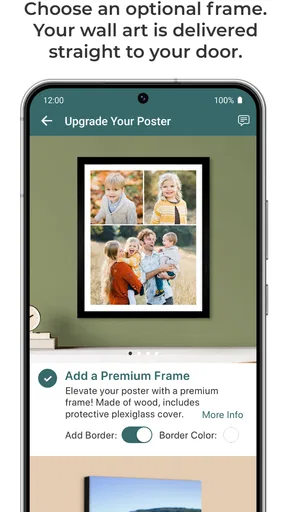
People who are sensitive to unexpected costs should be particularly deliberate during checkout. I would not assume that every optional enhancement, format, or order circumstance follows the same conditions as the central monthly offer. Read the screen, confirm what is selected, and avoid rushing past the summary. This is a small amount of extra attention that can prevent a frustrating surprise.
Another barrier is dependence on a smartphone-based visual workflow. Someone who cannot comfortably use a touchscreen, inspect photographs, or complete digital forms may need assistance from a friend or family member. That does not make the app unusable, but it changes the experience from independent ordering to supported ordering. For some users, a local photo shop with face-to-face help will be the more inclusive option, even if it is less convenient for others.
Compared with ordinary photo-editing apps, FreePrints Photo Art is less about transforming an image and more about giving a finished photograph a physical purpose. Compared with a traditional print shop, it is more convenient for a casual personal project but less suitable when a specialist needs to advise on paper, color, sizing, or installation. I would choose this app when I already have the right picture and want a simple route forward; I would choose an editor or professional service when the image itself still needs serious work.
My inclusive verdict after looking beyond the free offer
I think FreePrints Photo Art is a good fit for people who want a low-pressure way to turn a favorite picture into wall art. Its strongest quality is focus. PlanetArt has made the central idea easy to understand, and the free monthly approach gives casual users a reason to return without committing to a subscription. The high average rating of 4.8, drawn from roughly 7.4 thousand ratings, is consistent with an app that many people find approachable.
My recommendation comes with a clear condition: treat the preview and checkout as serious review points, not as formalities. Prepare the image first, inspect the crop carefully, and make sure the final order matches what you intend. Users who need detailed accessibility support, exact print specifications, or extensive design controls should consider a different route or involve another person in the final checks.
For an everyday memory project, a modest room refresh, or a thoughtful personal gift, I would be comfortable suggesting it to a friend. It is free, aimed at Everyone, and available on devices running Android 10 or later. I would skip it for professional photography, complex gallery layouts, or situations where independent visual verification is difficult. Within its intended space, though, it offers a practical bridge between a photo stored on a phone and something meaningful enough to live on a wall.
Verdict
Strengths of FreePrints Photo Art
- Lets you turn photos into creative collages, cards, and decorative designs.
- Useful for making personalized gifts without needing advanced editing skills.
- Offers a variety of templates and layouts for different occasions.
- Makes it easy to share finished creations digitally with friends and family.
- Simple interface helps beginners start designing quickly.
Limitations of FreePrints Photo Art
- Some artistic tools and templates may require in-app purchases.
- Design flexibility can feel limited compared with professional editors.
- Results depend heavily on the quality and resolution of your original photos.
- Ads or promotional offers may interrupt the free editing experience.
- Printing and delivery options may vary depending on your location.
Other Releases by PlanetArt
View All
FreePrints
Photography4.8

FreePrints Photo Tiles
Photography4.9

FreePrints Gifts
Photography4.8

FreePrints Photobooks
Photography4.8
Similar Picks in This Category
View All
Google Photos
Google LLC4.4

Gallery
Google LLC4.2

Picsart AI Photo Editor, Video
PicsArt, Inc.3.9

B612 AI Photo&Video Editor
SNOW Corporation4.1

BeautyPlus-Selfie Photo Editor
PIXOCIAL TECHNOLOGY (SINGAPORE) PTE. LTD.4.5

Remini - AI Photo Enhancer
Bending Spoons4.1
Frequently Asked Questions
What is FreePrints Photo Art and what can I do with it?
FreePrints Photo Art is a creative photo-printing app that lets you turn images from your phone into personalized printed products and photo gifts. Depending on the options available in your region, you can edit pictures, create layouts, add text or decorative designs, and order prints through the app. It is aimed at users who want a simple way to transform digital memories into physical keepsakes.
Is FreePrints Photo Art really free to use?
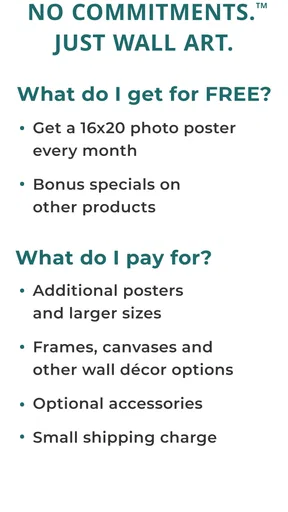
The app can generally be downloaded and used without an upfront subscription fee, but “free” does not mean that every order is completely cost-free. Certain promotional offers may include free or discounted prints, while shipping, handling, premium paper, larger formats, custom products, or additional copies may require payment. Before confirming an order, carefully review the final price, delivery charges, and any applicable promotion terms.
What types of photos and products can I order through the app?
FreePrints Photo Art may support common image formats stored on your device or connected photo services, allowing you to select individual pictures or create customized designs. Available products can vary by country and may include standard prints, enlargements, collages, cards, wall décor, or other photo gifts. The product catalog, sizes, finishes, and customization tools should be checked inside the app before starting your project.
How long does delivery take, and can I track my order?
Delivery times depend on the product you choose, the destination, production requirements, weekends, holidays, and the shipping method offered at checkout. Standard photo prints may arrive sooner than personalized gifts or larger items that require additional preparation. After placing an order, the app or confirmation email may provide status updates and tracking information, although tracking availability can differ depending on the selected delivery option.
Is FreePrints Photo Art safe for uploading personal photos and making payments?
The app requires access to selected photos so you can create and order your projects, but you should review its permissions and privacy policy before granting access. Use the platform’s official version from Google Play or the Apple App Store, keep your device updated, and avoid sharing unnecessary information. For payments, check that the checkout screen is secure and review the company’s policies regarding stored billing details, refunds, and order support.
